
Some projects are never really finished. You just stop working on them.
Back in January 2023 I wrote about my Button Box for Xbox. An Adafruit MacroPad RP2040 that pretended to be a USB keyboard, so I could change ABS, brake bias and traction control in Assetto Corsa Competizione on my Xbox Series X. It worked. It was also very much a 2023 solution.
This post is about going back to that old code, and replacing it with something better that I built together with AI.
Where it started
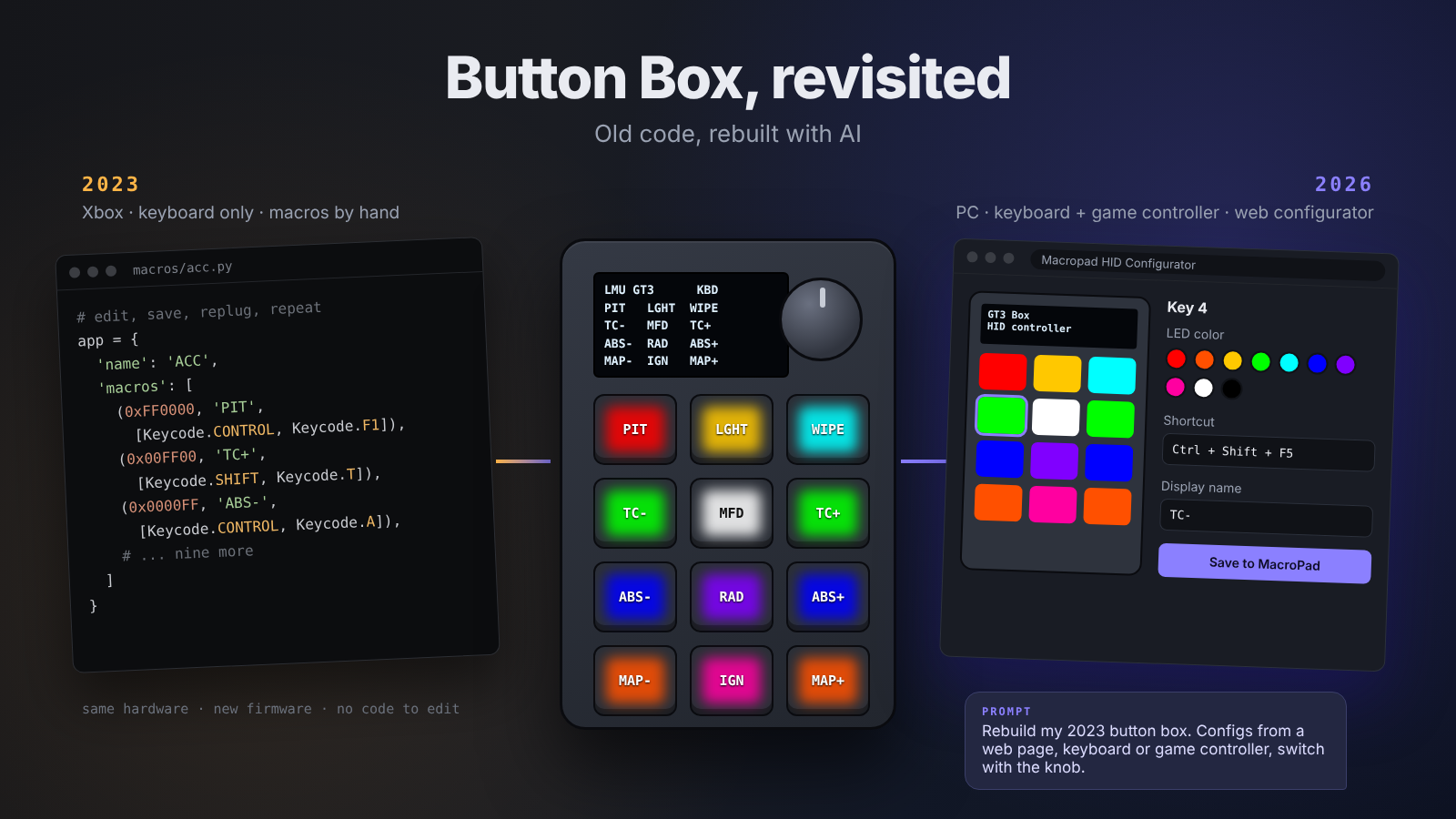
The original setup was based on the open source Macropad Hotkeys project. I wrote two macro files for ACC by hand. Every key was a line of Python with a color, a label and a key combo.
Want to change a color? Open the file, edit, save, and hope nothing broke. It did the job. For one game, on one console.
What changed since 2023
A lot, actually.
- I said farewell to the Xbox and moved to a gaming PC.
- ACC made room for Le Mans Ultimate, Assetto Corsa and iRacing.
- My rig grew up: direct drive wheel, haptic and hydraulic pedals, and VR.
The original reason for the button box was a closed console that only accepted keyboard input. That reason was gone. On PC every sim can read game controller buttons. Keyboard shortcuts still have their place, but during a race they can clash with chat or other apps.
So the old code solved a problem I no longer had, in a way I would no longer choose.
Patch or rebuild?
My first instinct was to patch. Add a game here, change a color there.
Then I thought back to my VibeCode Challenge. If I could build a complete lap time web app with Claude Code, why would I still edit macro files by hand?
So I left the old code alone. I described the button box I wanted today, and built it together with Claude Code.
My wish list was short:
- No code to edit. Ever. Set everything up from a web page.
- Keyboard and game controller in one device, without replugging.
- Switch setups with the knob, just like before.
- Show what each key does on the little display.
Meet Macropad HID
The result is Macropad HID. Same hardware, completely new software, plus a web configurator.
What it does now:
- As many configs as you like. Each config is a small JSON file stored on the MacroPad. Turn the knob to step through them.
- Two modes. A config is either a Keyboard (each key sends a shortcut) or an HID controller (each key is a game controller button).
- Web configurator. Open one HTML file in Chrome or Edge, select the MacroPad drive, and click a key to edit it. Record a shortcut by simply pressing it. Pick an LED color from 10 presets or any custom color.
- Save and go. Press Save, the MacroPad restarts for about a second, loads the new config and beeps.
- Labels on the display. In Keyboard mode every key gets a four letter name, shown in a 3 x 4 grid on the screen.
- Sleep and dim. Push the knob and everything goes dark. Or set a dim timer: the lights go off, but the keys keep working.
- It remembers. The last used config is stored on the board, even after you unplug it.
- Nothing in lib. The software only uses built-in CircuitPython modules.
Keyboard or game controller?
For sim racing, HID controller mode is the one to use. The buttons never clash with keyboard shortcuts or chat, and most sims read them even when SimHub or Discord has focus. You bind them in the game just like wheel buttons.
Keyboard mode is still handy for things that only accept keys, like OBS hotkeys or push to talk. Shortcuts use key positions, so they behave the same on QWERTY, AZERTY and other layouts.
The MacroPad always shows up as both a keyboard and a game controller. So switching between the two kinds of config never needs a replug.
2023 vs 2026
| 2023 | 2026 | |
|---|---|---|
| Platform | Xbox Series X | PC |
| Shows up as | USB keyboard | Keyboard and game controller |
| Setting it up | Editing Python macro files | Web configurator, no code |
| Switching | Knob | Knob, remembers the last config |
| Display | Config name and key labels | |
| Extra libraries | Needed in lib/ | None |
What I learned revisiting old code with AI
Start from the problem, not from the old code. If I had asked AI to “update my 2023 macros”, I would have gotten a nicer version of the wrong thing. The real question was: what do I need from a button box today?
Old code is still a great spec. My two ACC macro files told me exactly which functions mattered during a race. That list went straight into the new setup.
AI is great at the parts you would rather skip. USB report descriptors. The GRB byte order of the LEDs. Storing the last config in non-volatile memory. All details I never had to figure out by hand.
You still own the result. I tested everything on the real hardware. AI writes the code, but you decide when it is right. And Windows has its own surprises: it remembers old controller names, so sometimes you need to clean up Device Manager before the new name shows.
Give credit. The new software builds on ideas from Macropad Hotkeys and the MarcoPad gamepad software. Open source got me started in 2023, and it still does.
Build it yourself
What you need:
- Adafruit MacroPad RP2040
- CircuitPython 10.x for the MacroPad
- Google Chrome or Microsoft Edge (Safari and Firefox can’t save to a drive from a web page)
The steps:
- Install CircuitPython on the MacroPad.
- Copy boot.py and code.py to the CIRCUITPY drive.
- Unplug the MacroPad and plug it back in.
- Open index.html in Chrome or Edge, select the drive, and create your first config.
The code is available on my GitHub. It is MIT licensed, so feel free to use it and make it your own.
Bottom line
In 2023 the button box was a workaround for a closed console. In 2026 it is a tool I can set up in a minute from a web page.
The hardware did not change at all. The code changed completely.
That is the real shift for me. Old code is no longer something you either maintain forever or throw away. You can revisit it, keep what it taught you, and let AI rebuild the rest.
Disclaimer
Building this and getting it to work is your own responsibility. You need some basic computer skills and understanding to get this working.