
The best network is the one you never think about.
For years my TP-Link Deco M9 Plus mesh did its job. Four pods spread through the house, WiFi in every room, no real complaints. But no complaints is not the same as fast.
Why I wanted to upgrade
Two things kept bugging me.
- First, my game PC. Speed tests stayed around 300 Mbps, while my internet connection could do a lot more.
- Second, the upper floors. I wanted high network speeds on the 2nd and 3rd floor. The usual answer is simple: run a network cable. In my house that was not an option. I could not get cables up there, so I needed another solution.
That solution had to be wireless, and fast enough to feel like a cable.
Why the Deco XE75 Pro
The XE75 Pro is a tri-band WiFi 6E mesh system. The key part for me is the 6 GHz band. Deco uses it as a dedicated backhaul between the pods. That is the wireless link that carries traffic from one pod to the next, and it is exactly the part I could not solve with cables.
Each unit also has a 2.5 Gbps port and two gigabit ports, so I can plug in wired devices wherever a pod sits.
Three XE75 Pro pods replaced four M9 Plus pods. Fewer boxes, more speed.
The results
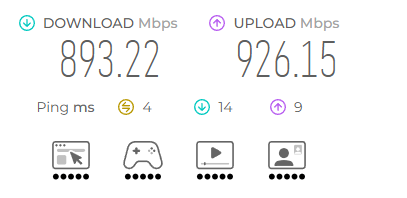
The numbers on my game PC:
- Download: from 300 Mbps to 890 Mbps
- Upload: almost 1 Gbps
That is the exact upgrade I was looking for.
The setup is simple. My game PC is connected with a cable to one Deco pod. That pod talks to the main Deco over the backhaul. The PC gets a wired connection to the pod, and the pod gets a fast wireless link back to the main unit. Close to cable speed, without a cable through the house.
The hard part, moving all the clients
The hardware was the easy part. Moving every device to the new network was not.
I decided not to reuse the old SSID. I wanted a fresh start with a completely new network name. Which means every device in the house had to be reconnected by hand. Phones, laptops, and all the devices you forget about until they stop working.
In hindsight, that may not have been the best decision. Reusing the same SSID and password would likely have moved most devices over on their own. But hey, we learn along the way.
What I learned
- Reuse your SSID and password if you can. It saves a lot of reconnecting.
- A dedicated wireless backhaul makes a real difference when cables are not an option.
- Plug your most important device into a pod with a cable. Let the pod handle the wireless part.
- Fewer, newer pods can beat more, older ones.
Final thoughts
The Deco XE75 Pro did exactly what I hoped.
- More speed.
- More stability.
- Fast WiFi on every floor.
I am really happy with the stable, high-end WiFi in my home now. And as a gamer, a game PC pulling almost full speed without a cable through the house is an upgrade I notice every day.